
Structure
A component that lets users toggle between a group of 2-6 options. It can be set as single select or multiple select and displayed vertically or horizontally.
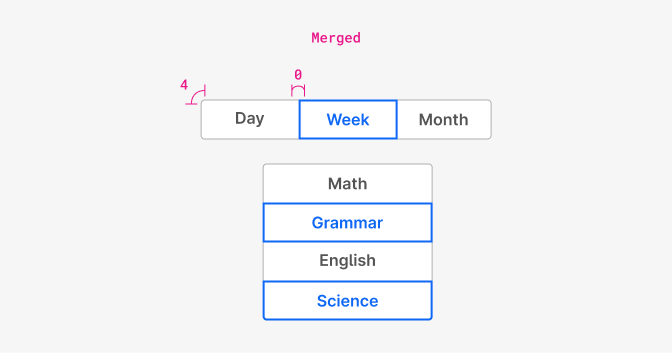
| Property | Token | Pixel | Rem |
|---|---|---|---|
| Border radius | radii-0 | 4px | 0.25 |
| Border radius merged | none | 0 | 0 |
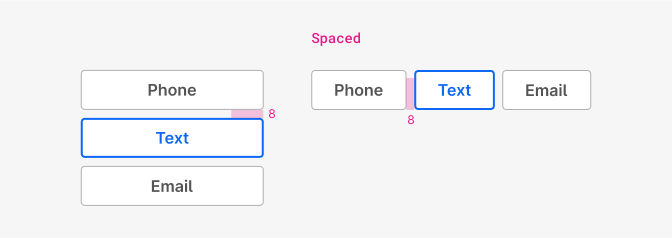
| Property | Token | Pixel | Rem |
|---|---|---|---|
| spacing sm (default) | space $2 | 8 | 0.5 |
| spacing md | space $3 | 12 | 0.75 |
| spacing lg | space $4 | 16 | 1 |
| spacing xl | space $5 | 32 | 2 |
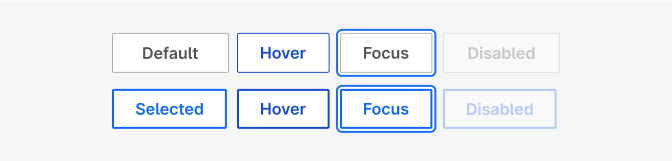
| Property | pixel |
|---|---|
| Border-width (inside) - Default, hover (default) | 1px |
| Border-width (inside) - Selected, hover (selected) | 2px |
| Focus shadow - Border (width 2px white gap) | 2px |
Size
Change the size of the entire group button, including padding, font size and border with the size property.
Toggle group has the same height as a regular buttons (32px, 40px and 48px).
Within the group, all segments are equal in width, taking the width from the longest label used.
There’s an option that sets the button-group to fullwidth and every child to grow with same width to fill the available space of the parent container.
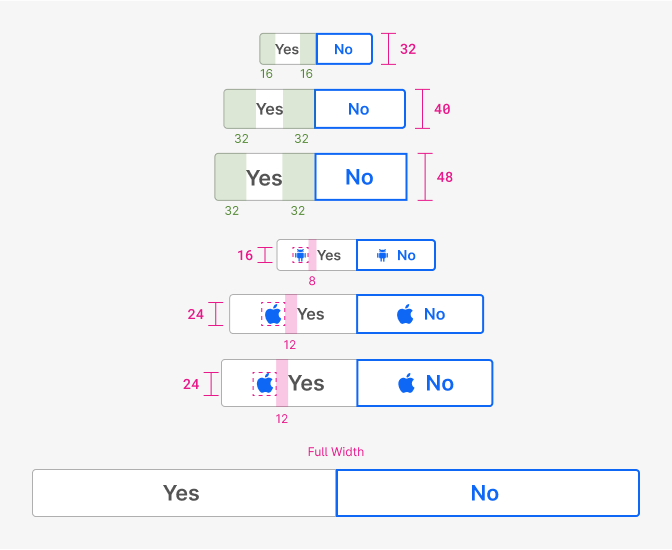
| Property | xs | sm | md | lg |
|---|---|---|---|---|
| Height | 32px | 32px | 40px | 48px |
| min-width | 32px | 48px | 60px | 72px |
| Icon size | sm 16px | md 16px | lg 24px | lg 24px |
| Property | Token | Pixel | Rem |
|---|---|---|---|
| Padding xs | space $3 | 12px | 0.75 |
| Padding sm | space $4 | 16px | 1 |
| Padding md | space $5 | 32px | 2 |
| Padding lg | space $5 | 32px | 2 |
| Icon margin-right sm | space $2 | 8px | 0.5 |
| Icon margin-right md, lg | space $3 | 12px | 0.75 |
Icon only
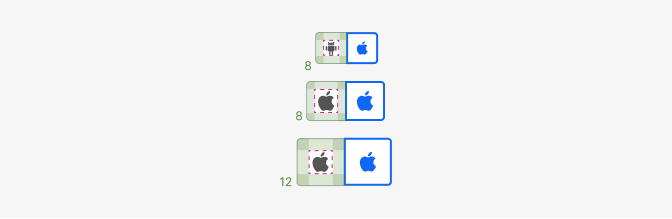
| Property | Token | Pixel | Rem |
|---|---|---|---|
| Padding xs | space $2 | 8px | 0.5 |
| Padding sm | space $2 | 8px | 0.5 |
| Padding md | space $2 | 8px | 0.5 |
| Padding lg | space $3 | 12px | 0.75 |
Typography
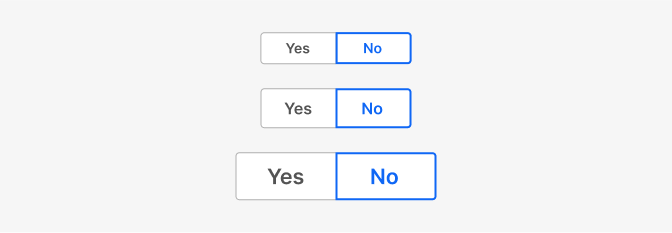
| Font | Family | Weight | Size | Rem | Px |
|---|---|---|---|---|---|
| lg | $body | 600 | $lg | 1.3125 | 21 |
| md | $body | 600 | $md | 1 | 16 |
| sm | $body | 600 | $sm | 0.875 | 14 |
Color
By default the segmented control has a height of 32px (the same as a button). You should however keep things on the 8px grid or in some cases the 4px grid. You should only need the following recommended heights.
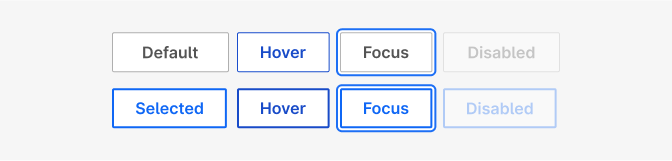
| Property, Element & State | Token | Hex |
|---|---|---|
| Bg color | $white | #ffffff |
| Border-color - Default | $grey600 | # |
| Border-color - Selected, Focus | $blue800 | # |
| Border-color - Selected hover | $blue900 | # |
| Font-color - Default, Default focus | $grey800 | # |
| Font-color - Selected, Selected focus | $blue800 | # |
| Font-color - Hover | $blue900 | # |
Dark color mode
For use on dark (grey-1000) surfaces with colorMode="dark". Both themes share these values:
| Property, Element & State | Token | Hex |
|---|---|---|
| Bg color | none | — |
| Font-color - Default | $grey200 | #ebebeb |
| Font-color - Selected, Hover | $white | #ffffff |
| Focus ring - Inner gap (2px) | $grey1000 | #1f1f1f |
The modern theme also sets:
| Property, Element & State | Token | Hex |
|---|---|---|
| Group bg color | $grey800 | #545454 |
| Bg color - Selected | $grey900 | #333333 |
| Border-color - Selected | $grey800 | #545454 |
The standard theme keeps its grey600 borders and dividers; the selected border follows the white font colour.
| State | Value |
|---|---|
| Disabled: all elements | 30% opacity |